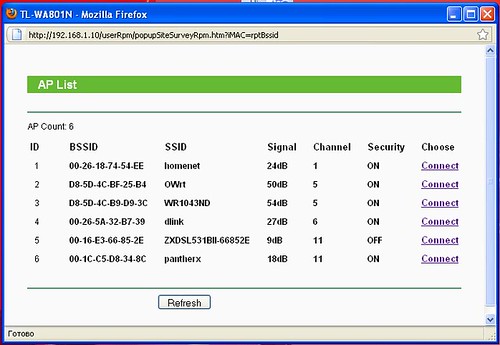
TP-Link TL-WA801ND Access Point configured as Repeater Scanning wireless networks, to identify needed SSID/BSSID for connection
I selected from this list SSID 'OWrt', with mac address of WR841ND router (flashed with OpenWrt)
***
Беспроводная точка доступа TP-Link TL-WA801ND сконфигурированная как Повторитель (Repeater) - Сканирование беспроводных сетей для выбора требуемого SSID/BSSID точки доступа, с которой будет установлено соединение
Я выбрал из указанного списка SSID 'OWrt', с mac-адресом, принадлежащим маршрутизатору WR841ND (с установленным на него OpenWrt)
воскресенье, 7 ноября 2010 г.
TP-Link WA801ND in Repeater mode - Scan wireless networks

TP-Link WA801ND in Repeater mode - Status
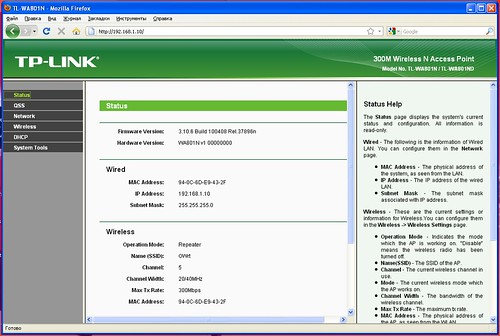
TP-Link TL-WA801ND Access Point configured as Repeater - Status page
You can check here all parameters - Operation mode, SSID, Channel, Channel width, Mac address - to make sure that you have all settings defined correctly.
***
Беспроводная точка доступа TP-Link TL-WA801ND сконфигурированная как Повторитель (Repeater) - Статус
Вы можете проверить здесь основные установки - Operation mode, SSID, Channel, Channel width, Mac address - чтобы убедиться, что всё установлено правильно
TP-Link WA801ND Repeater to OpenWrt - Wireless Statistics
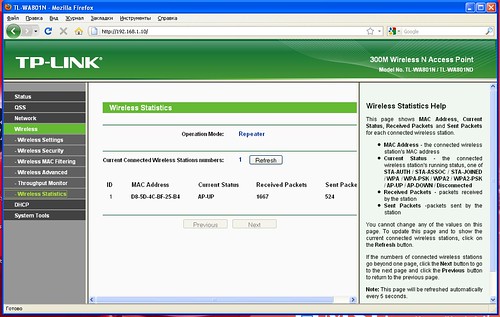
TP-Link TL-WA801ND Access Point configured as Repeater to OpenWrt - Wireless Statistics
Connection with RootAP established.
***
Беспроводная точка доступа TP-Link TL-WA801ND сконфигурированная как Повторитель (Repeater) к OpenWrt - статистика/статус беспроводного соединения
Соединение с "Головной точкой доступа" (RootAP) установлено
TP-Link WA801ND Repeater to OpenWrt - Wireless Settings
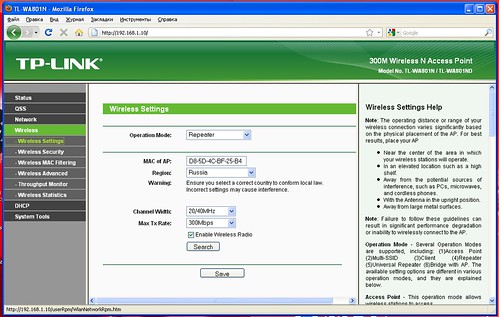
TP-Link WA801ND Repeater to OpenWrt - Wireless Settings
TP-Link TL-WA801ND Access Point configured as Repeater to OpenWrt - Wireless Settings
This was first step to test possibility of connection WA801ND to OpenWrt wireless router (in my case - WR841ND) in Repeater mode.
As you will see from next screenshots, such scheme works just fine.
***
Беспроводная точка доступа TP-Link TL-WA801ND сконфигурированная как Повторитель (Repeater) к OpenWrt - настройки беспроводного соединения
Эти установки были первым шагом по тестированию возможности соединения беспроводной точки WA801ND к маршрутизатору с установленным на него OpenWrt (в моём случае- WR841ND) в режиме Repeater (Повторитель).
Как будет видно из последующих экранов, такая схема работает.
вторник, 2 ноября 2010 г.
Tomato 1.27 * Port Forwarding - UPnP
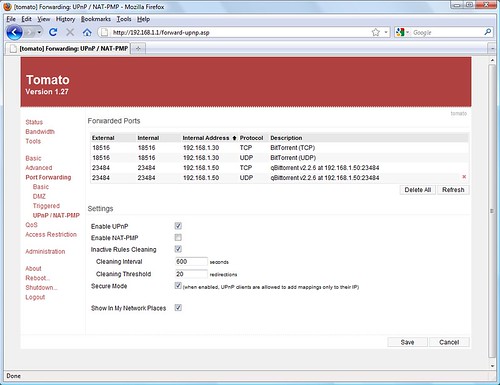
Linksys WRT54GL Wireless 802.11g Router running Tomato USB firmware.
Port Forwarding - Universal Plug and Play page.
- Universal Plug and Play support allows UPnP-enabled programs (like BitTorrent, KTorrent) to open ports on router automatically.
This is required to achieve maximum transfer speed between computer "hidden" behind your Router with Firewall/NAT enabled, and computers in the Internet.
Otherwise other Torrent users do not see your computer, and can't initiate connection.
Tomato 1.27 firmware * About Tomato
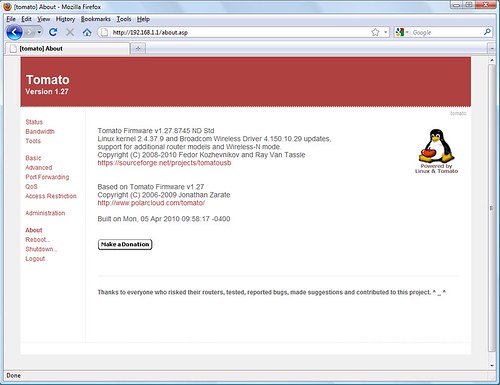
Linksys WRT54GL Wireless 802.11g Router running Tomato USB firmware.
About Tomato page.
TomatoUSB Features
- Interactive Ajax based GUI using SVG and CSS-based color schemes (allowing GUI look and feel changes).
- CLI access (BusyBox) via TELNET or SSH (using Dropbear).
Wireless modes:
* Access Point (AP)
* Wireless Client Station (STA)
* Wireless Ethernet (WET) Bridge
* Wireless Distribution System (WDS aka wireless bridging)
* Simultaneous AP and WDS (aka Wireless Repeating).
- DHCP server.
- DNS forwarder (using Dnsmasq).
- Universal Plug and Play support allows UPnP-enabled programs (like BitTorrent, KTorrent) to open ports on router automatically.
Linksys WRT54GL Router (hardware) Specification:
- Supports 802.11g and 802.11b standards
- Two External non-detachable Antennas
- 1 WAN port (Ethernet RJ-45)
- 2 LAN port (Ethernet RJ-45)
Tomato 1.27 Firmware * Realtime Bandwidth Monitoring - br0 interface
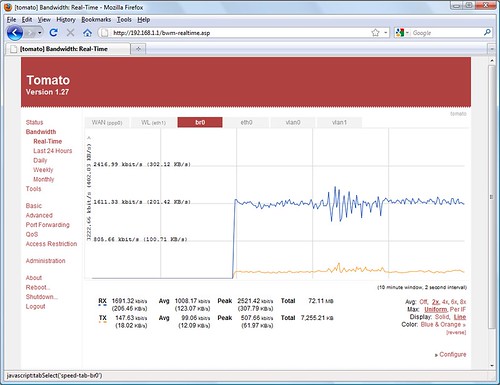
Tomato 1.27 Firmware * Realtime Bandwidth Monitoring - br0 interface, originally uploaded by v.plessky.
Tomato USB firmware.
Realtime Bandwidth Monitoring - br0 interface
br0 interface - Bridge-LAN
Подписаться на:
Сообщения (Atom)